
Powered by generative AI. Results may not fully be accurate. Use is governed by the Generative AI Guidelines and other applicable Walmart policies.
Menu
Local Seller Support
Walmart GoLocal is a delivery service for businesses of all sizes looking to offer local delivery to their customers, with the speed and service they’ve come to expect. Our clients enjoy:
- White-label delivery, to own the customer relationship end-to-end
- Extensive US coverage, particularly suburban and rural areas
- Speed and cost efficiency
- Flexible delivery options
How does it work?
- A customer places an order through your owned commerce channels
- We receive your delivery request
- A driver picks up the order at your location
- The driver completes the delivery to your customer
To sign up or learn more, visit our Home Page.
If you’re a registered Local Seller, you can login to the Book Delivery Portal to book and manage your deliveries.
Walmart Local Marketplace enables you to expand your customer base and boost demand by listing your store as part of an exclusive local marketplace on Walmart.com. As a Walmart Local Seller, you will:
- Reach thousands of Walmart.com shoppers in your community
- Easily market to local customers online
- Unlock a major incremental sales channel for your business
- Boost reputation and trust for your brand
How does it work?
- A customer places an order through Walmart.com
- You pick and stage the order for either customer pick-up at your store or delivery
- For delivery orders a driver picks up the order at your location
- The driver completes the delivery to your customer
To sign up or learn more, visit our Home Page.
If you’re a registered Local Seller, you can manage your account and orders in the Local Marketplace Seller Portal.
To book a Walmart GoLocal white-label delivery, follow a few simple steps:
1. Log in to the Book Delivery Portal.
2. Navigate to the Dispatcher tab and select Book Delivery. Then add order details, select a delivery window, and add drop-off notes for the driver.
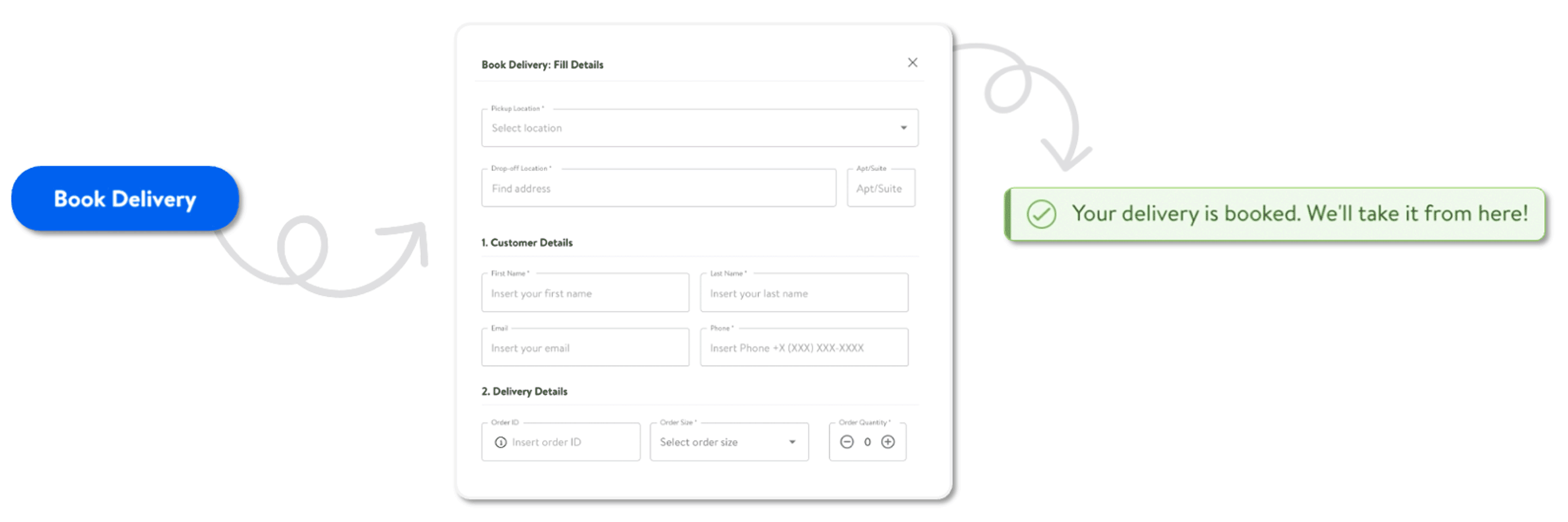
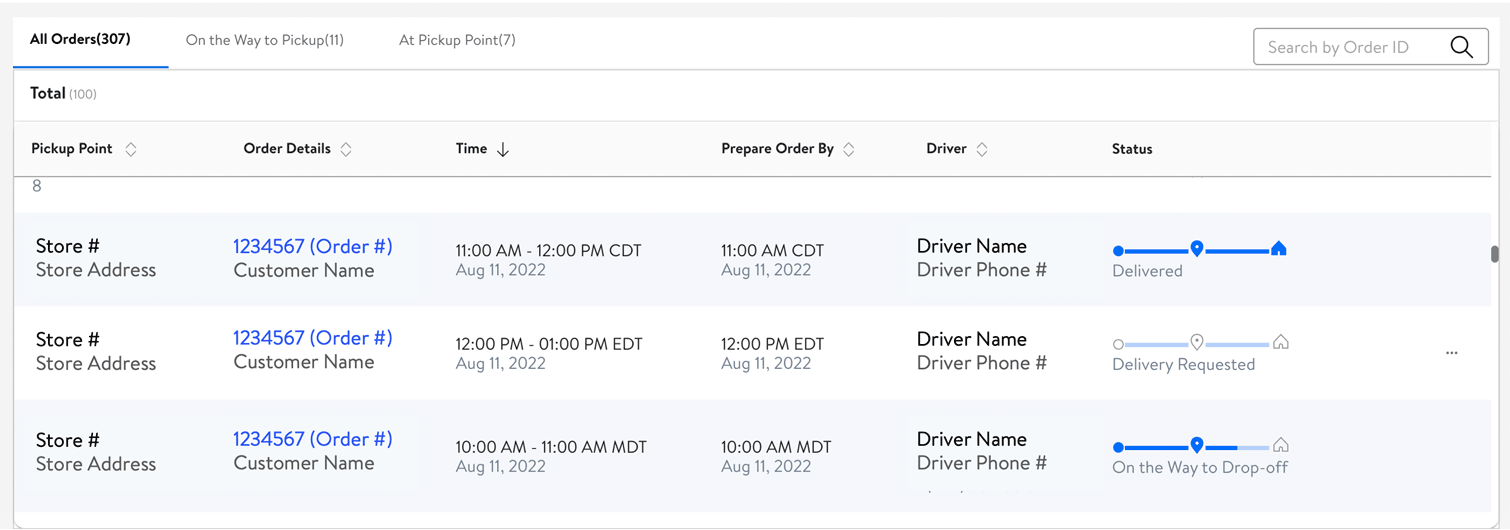
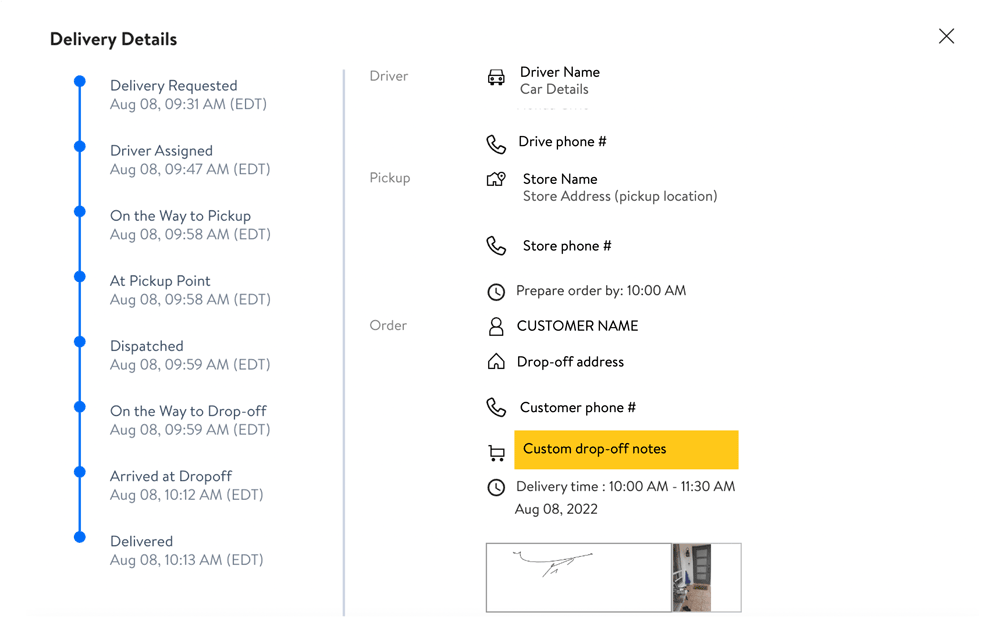
3. Track your delivery and view past orders in the Dispatcher tab.
Some best practices for a smooth delivery:
- Pick and pack your orders before booking a delivery to ensure a quick handoff and even quicker delivery
- Add customer drop-off instructions per order so drivers know what to do when they reach your customer
- If you have multiple packages in a single delivery, label each package with the package number to ensure drivers don’t miss any packages: e.g. “1 of 3”, “2 of 3”, “3 of 3"
You can accept and manage Walmart Local Marketplace orders via the Order Manager app.
1. When a customer places an order on Walmart.com you will be notified via email, and directly within the Order Manager app.
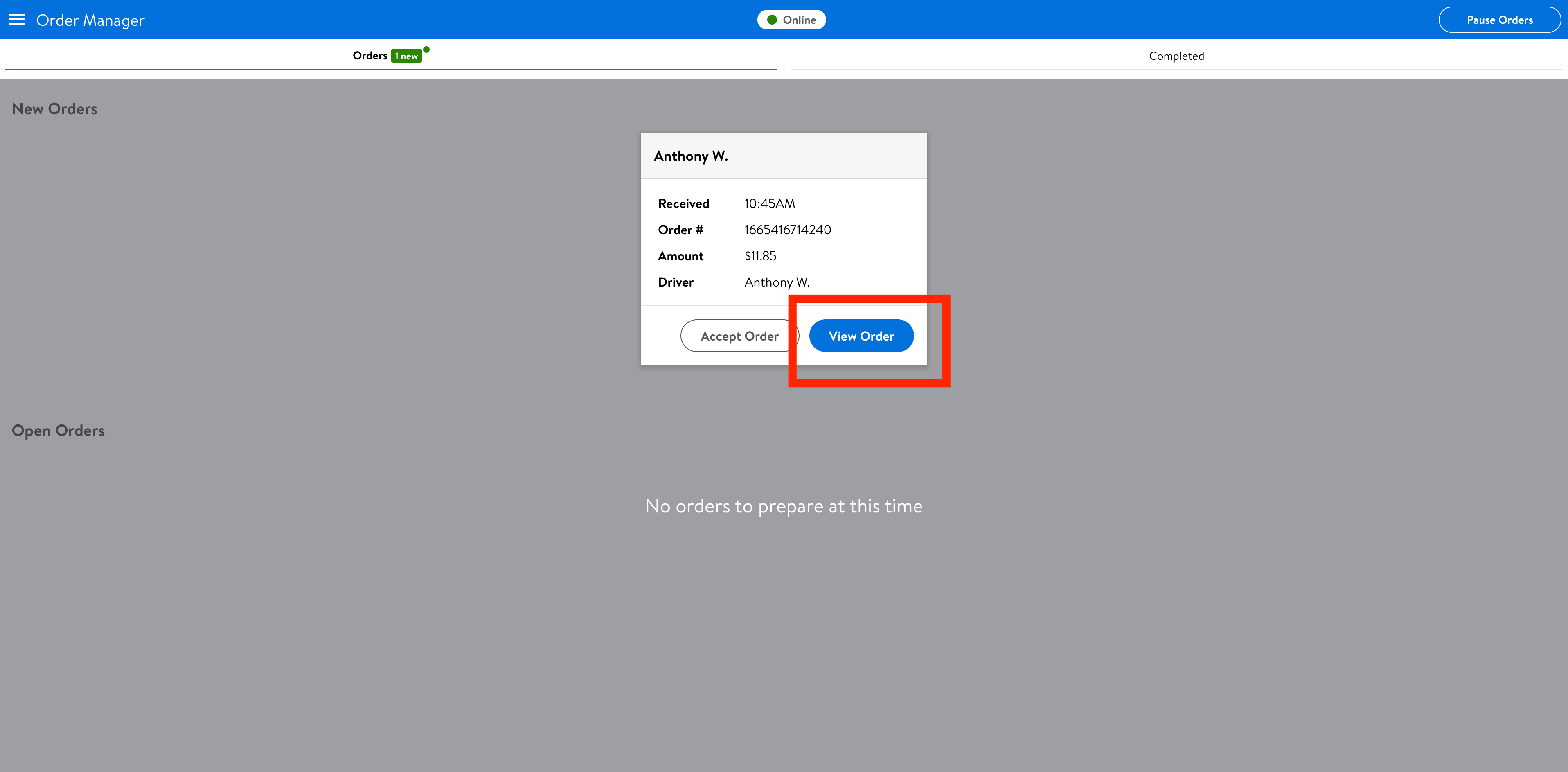
2. Accept the order by selecting ‘Accept Order’ on the order card. You can also view more details of the order, see any customer notes, and estimated pickup time.
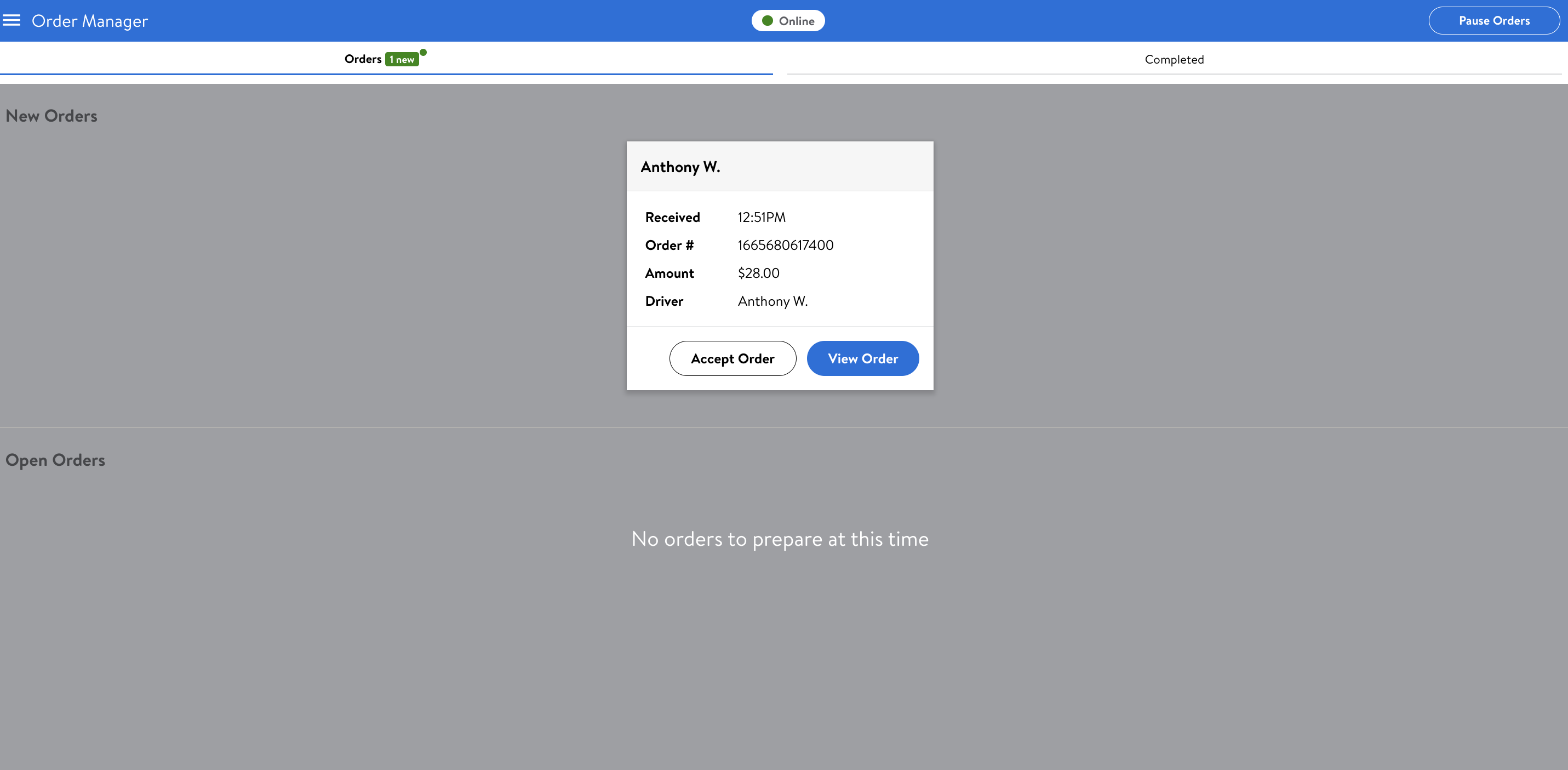
3. Pick and pack the order for pickup by the customer or driver.
If you are unable to fulfill an order, you can decline the order by selecting View Order > Issue with Order. Note that multiple order rejections can negatively impact customer experience. If you do not want to accept orders you can select Pause Orders on the top right of the Order Manager app to temporarily pause your store.
Some best practices for a smooth delivery:
- Accept orders quickly as this gives customers peace of mind that their order is being prepared
- Pick and pack your orders in a timely manner to ensure a quick handoff and even quicker delivery
- If you have multiple packages in a single delivery, label each package with the package number to ensure drivers don’t miss any packages: e.g. “1 of 3”, “2 of 3”, “3 of 3”
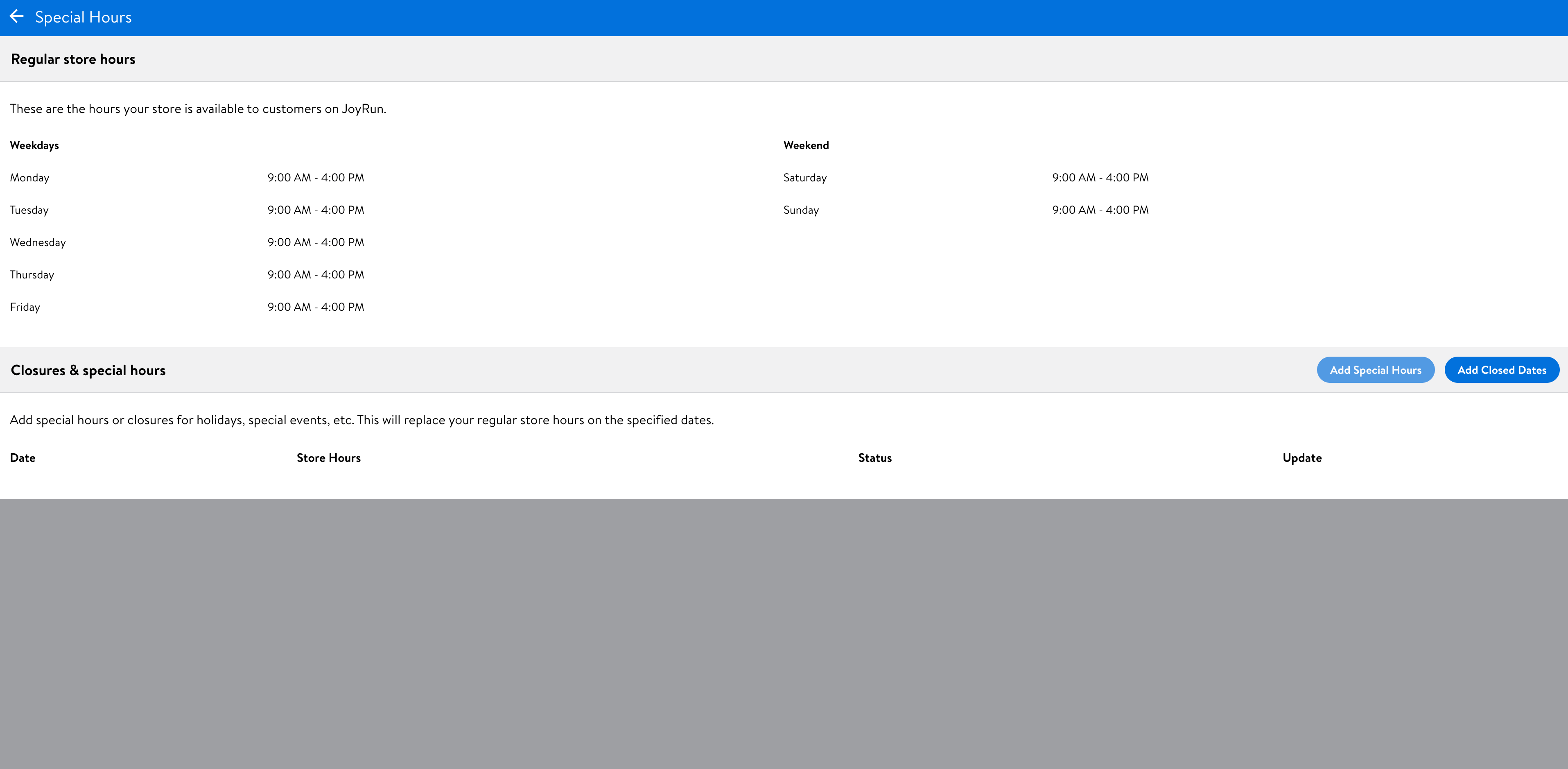
If you need to change your store hours for an upcoming holiday or unexpected change in operations, you can add special hours or closed dates within the Order Manager app.
1. Select the top left navigation menu.
2. Go to Special Hours and follow the prompts to add special hours/closed dates.
3. If you need to change your regular store hours, please contact Local Seller Help.
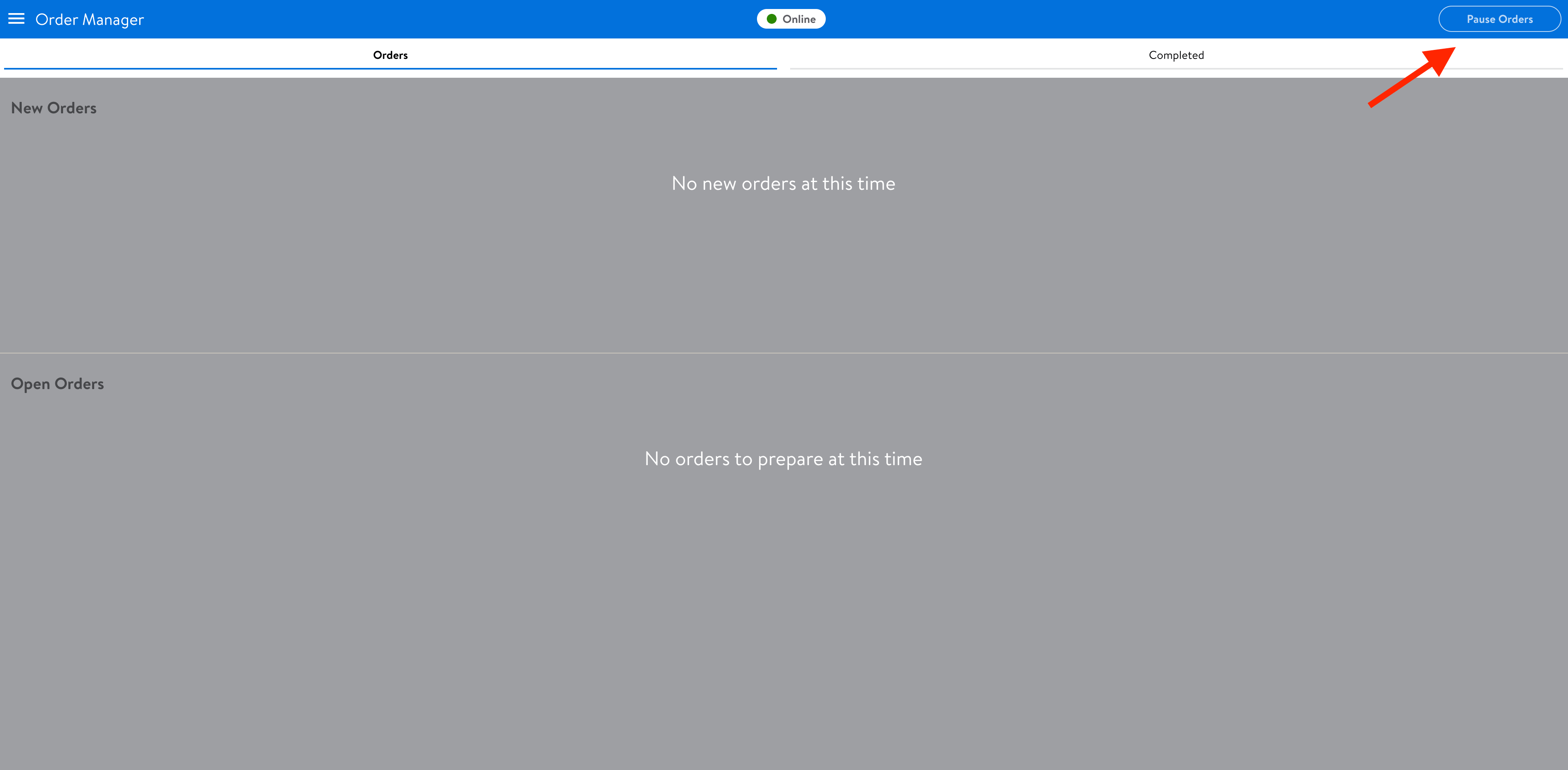
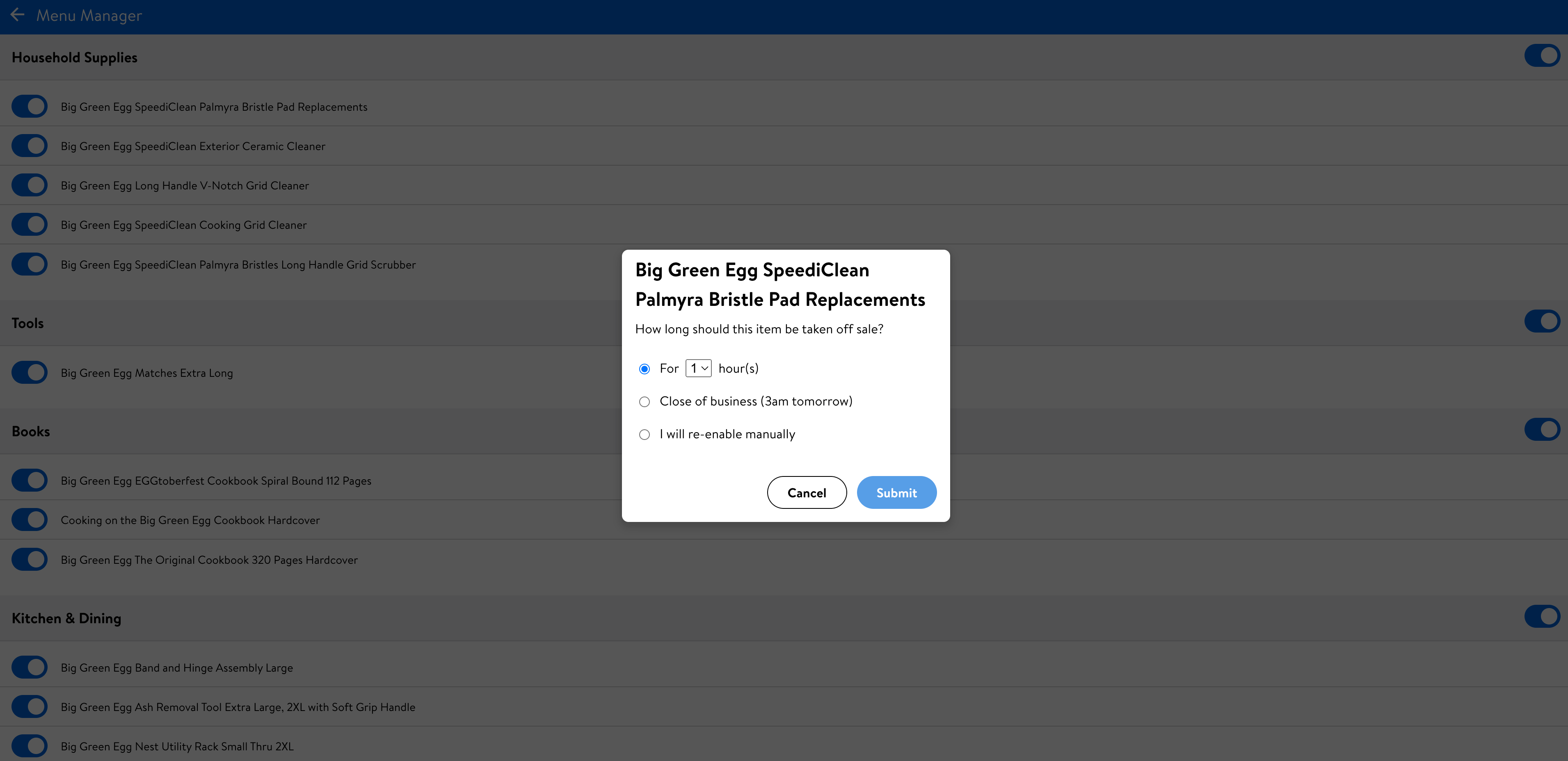
You can also temporarily pause all incoming orders, or make items unavailable directly in the Order Manager app.
- To pause all incoming orders, hit Pause Orders on the top right-hand corner.
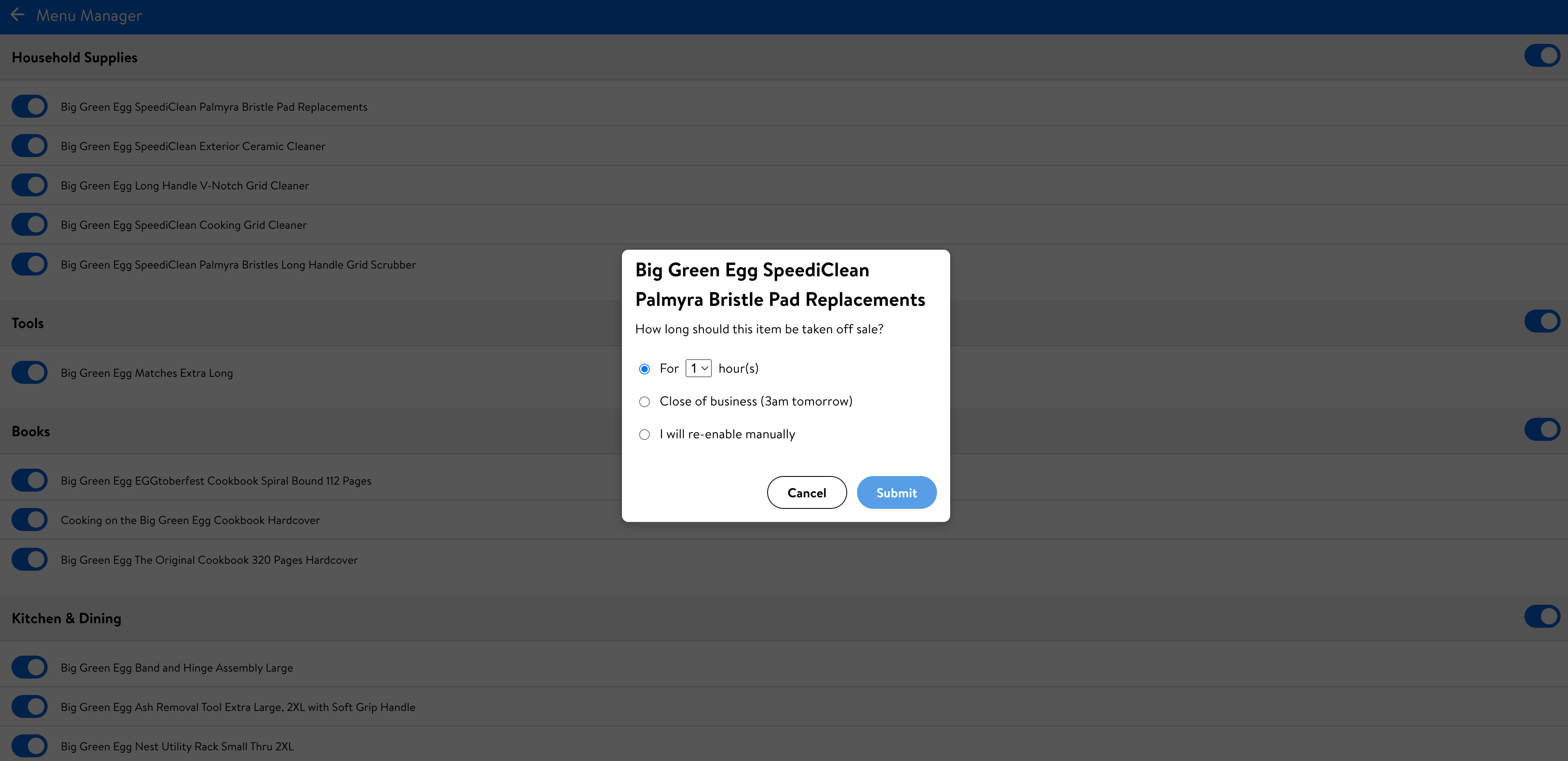
- To pause certain items from being available, go to the Menu Manager via the top left navigation menu.
- Then simply toggle items on and off and select how long to make them unavailable for.
Deliveries on Walmart GoLocal and Walmart Local Marketplace are fulfilled by third-party drivers on the Spark Driver platform.
To help maintain a positive experience for sellers, drivers and customers, and ensure orders are delivered correctly, the Spark Driver platform outlines Service Level Standards that cover professionalism, reliability, and safety.
The Spark Driver platform also provides drivers visibility into four key metrics to help with meeting the Service Level Standards; On-Time Arrival, Drop Order Rate, Acceptance Rate and Customer Rating. For more information visit Spark Driver Service Level Standards Metrics.
Orders received via the Walmart Local Marketplace Order Manager:
- You can cancel Walmart Local Marketplace orders before they are accepted.
- To cancel or reject a Walmart Local Marketplace order, select View Order > Issue with order and follow the prompts.
- If you need to cancel an order after it has been accepted, contact support at 877-471-0022.
Deliveries booked through the Book Delivery Portal:
- Deliveries booked through the Book Delivery Portal can be cancelled directly in the portal by selecting the order in the Dispatcher tab > Actions > Cancel. This can generally be done until a driver has picked up the order.
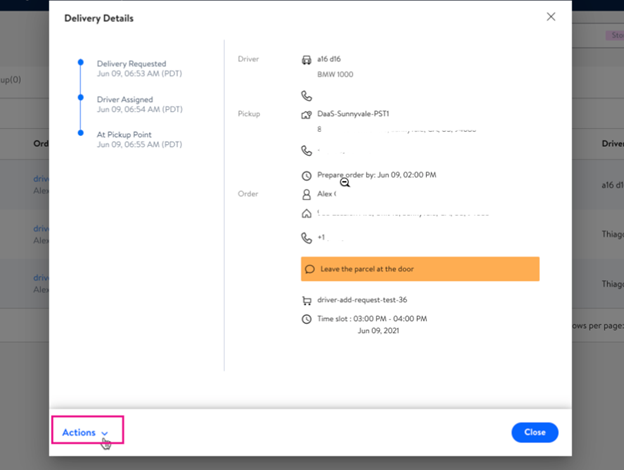
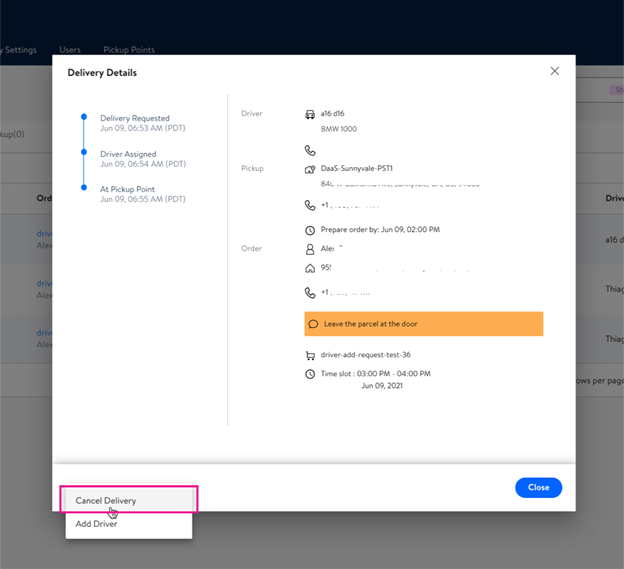
- If you are unable to cancel a delivery, contact support at 877-471-0022.
- Note that you may incur a cancellation fee.
Orders received via the Walmart Local Marketplace Order Manager:
- When an order is placed, drivers are automatically dispatched to pick up orders from your location.
- Drivers are provided guidance on when to pick up and drop off orders based on the delivery window selected by the customer.
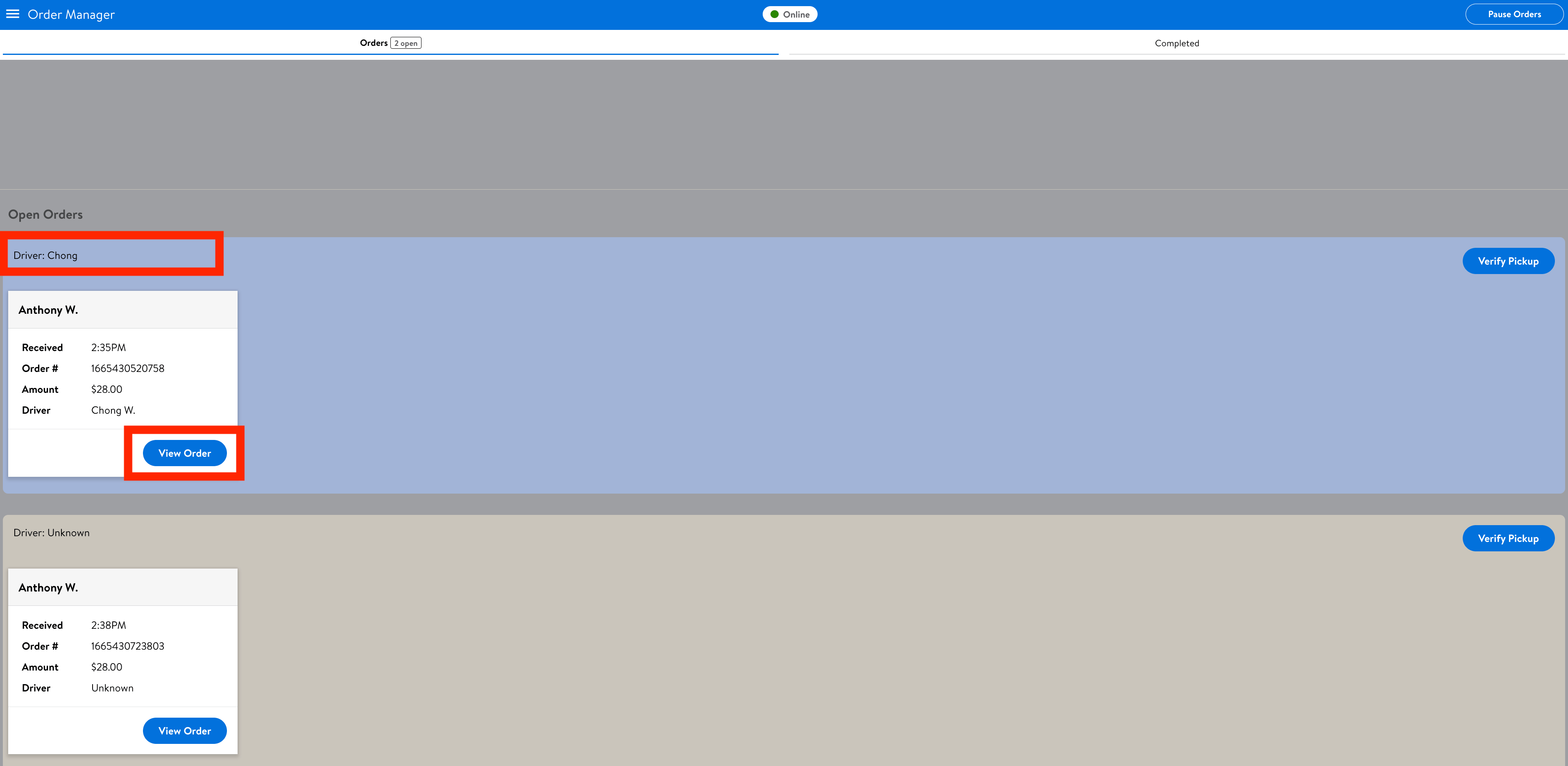
- As soon as a driver is assigned to your order, the order card in the Order Manager app will show the driver’s name.
- The best way to understand where your driver is, is by contacting them directly by selecting View Order and calling the number shown at the top of the card.
Deliveries booked through the Book Delivery Portal:
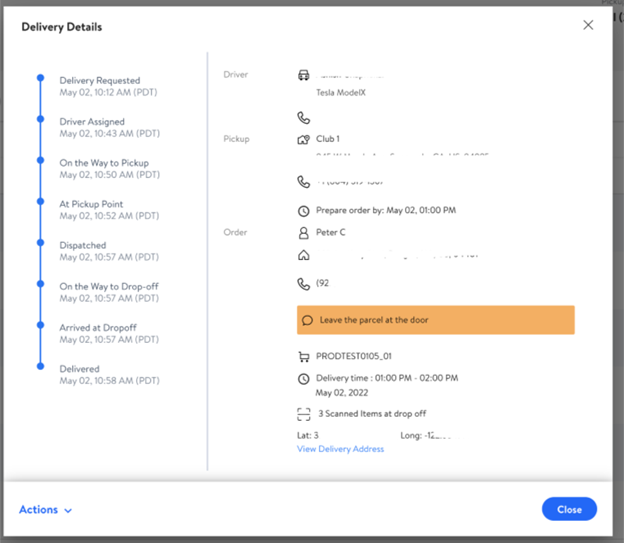
- In the book delivery portal, navigate to the Dispatcher tab to view all ongoing orders.
- Find the delivery you want to see details for.
- Select the Order ID to view details of the delivery.
We understand that deliveries don’t always go according to plan. If you have any issues with missing, incorrect, or damaged items please let us know as soon as possible by contacting Local Seller Help.
Please provide details including:
- Order ID
- Description of which items were impacted
- Description of the issue
- For deliveries booked through the Book Delivery Portal, please also provide an invoice showing the value of the impacted goods.
We review issues on a case by case basis and aim to provide a fair outcome to all parties.
Returns on attended deliveries
Deliveries can be attended or unattended. Attended deliveries require a customer to be available to sign and receive the order when the driver arrives at drop-off. In cases where a customer is unavailable for an attended delivery, drivers may be instructed to return the goods to your store.
Change of mind returns
Unfortunately we currently do not support returns in cases where customers change their mind about a purchase.
If you have any further questions about returns, contact Local Seller Help.
To make a change to your catalog please contact Local Seller Help.
Please provide details of the changes you’d like to make, including:
- Item names
- Item descriptions
- Any item variations (e.g. color, size)
- Prices
- Images
If you’d simply like to remove an item from your catalog, you can also mark items as unavailable yourself by:
- Logging in to the Order Manager app
- Top left-hand menu
- Menu Manager
- Toggle items on/off
Orders received via the Walmart Local Marketplace Order Manager:
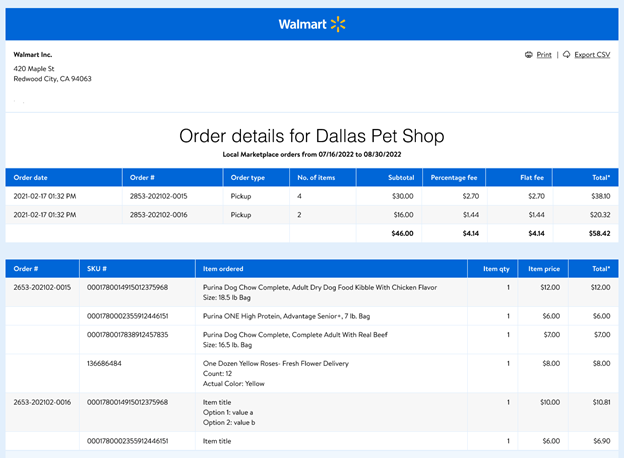
For orders received via the Order Manager app, invoices are generated and paid to you on a weekly basis. Follow the steps below to access invoices for Walmart Local Marketplace orders:
- Login to the Seller Portal
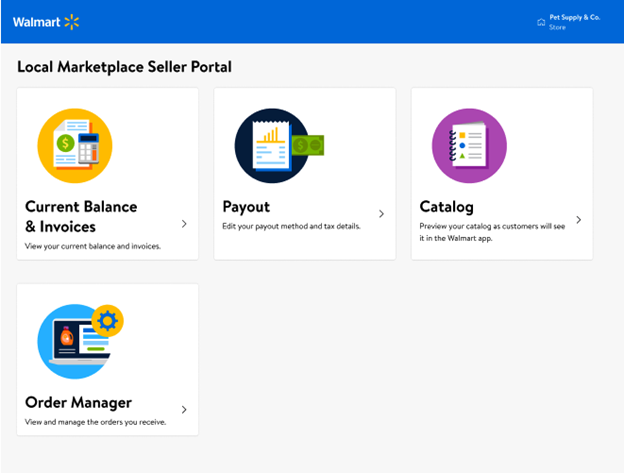
- Select Current Balance & Invoices
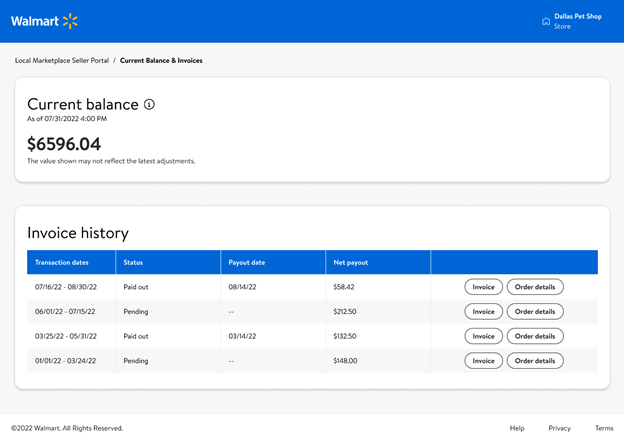
- Select Invoice to view a summary of amounts for each invoice
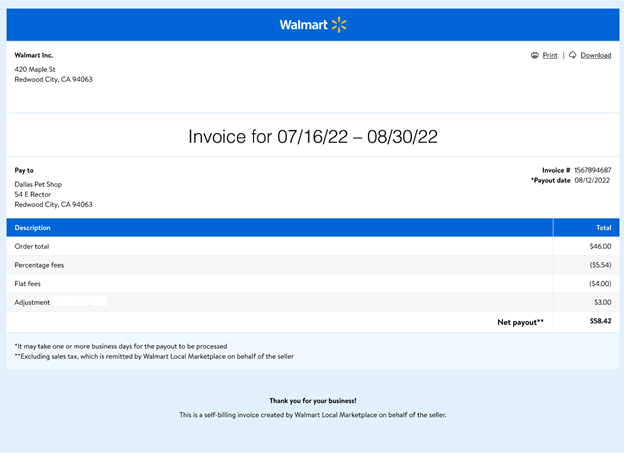
- Select Order details to view an order and item level breakdown for the invoice
Deliveries booked through the Book Delivery Portal:
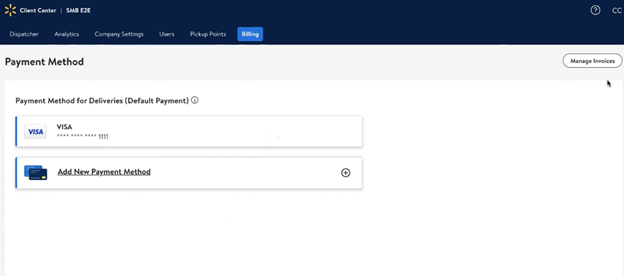
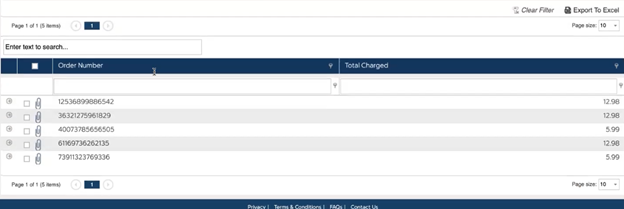
For deliveries booked through the Book Delivery Portal, your payment method on file will be charged daily for any deliveries booked. Follow the steps below to access invoices for deliveries booked through the Book Delivery Portal:
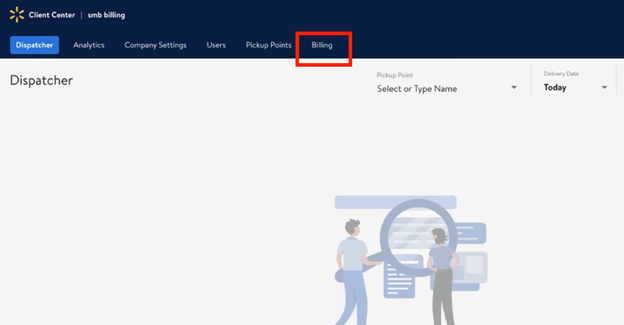
- Login to the Book Delivery Portal
- Navigate to the Billing tab
- Select Manage Invoices
Orders received via the Walmart Local Marketplace Order Manager:
- To add or edit payout details for orders received through the Order Manager app, login to the Seller Portal
- Select Payout and follow the prompts
Deliveries booked through the Book Delivery Portal:
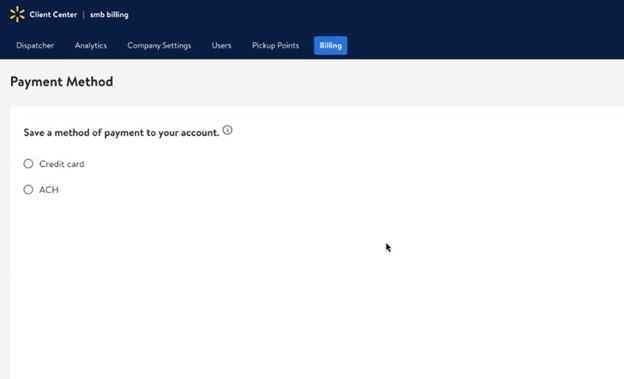
- To add or edit your payment method for booking deliveries, login to the Book Delivery Portal
- Navigate to the Billing tab and follow the prompts
When a customer places an order on Walmart.com you will be notified via email, and directly within the Order Manager app. You can accept and manage Walmart Local Marketplace orders via the Order Manager app.
If you’re not receiving order notification emails, or would like to change the recipient of your order notification emails, please contact Local Seller Help.
Currently we only allow one email recipient to receive order notification emails, we recommend using a shared business email address that is accessible by employees of your business.
If you’d like to temporarily stop receiving orders on Walmart Local Marketplace you can pause, close or set special holiday hours for your store via the Order Manager app.
If you’d like to permanently remove yourself from the platform, please contact Local Seller Help.
To sell Alcohol products on the Walmart Local Marketplace, sellers must possess a valid and current license to do so and be pre-approved by Walmart.
While alcohol’s definition can vary between state and local laws, alcohol is typically considered any product that contains more than one-half of one percent (0.5%) of alcohol by volume and is intended for human consumption. Common types of alcohol are beer, wine, ready-made cocktails and spirits/liquor.
According to the Alcohol and Tobacco Tax and Trade Bureau (TTB), the top errors in advertising (which includes online listing content) are:
- Mandatory statements and/or disclosures are missing, such as:
- Alcohol content (percent alcohol by volume) of distilled spirits, beer, and wine
- Class and type to which the product belongs, corresponding with the information shown on the approved label. Examples: Red wine, white wine, lager, stout, ale, bourbon whiskey, vodka or gin.
- False or misleading health claims or health-related statements are made, such as:
- "will improve memory"
- "will improve memory"
- "no headaches"
- "provides energy"
- Statements that create a misleading impression about the identity, origin, or other characteristics of the product
- A product label depicted on a bottle/can in the online listing is not a reproduction of the approved physical label
- A calorie or carbohydrate claim is made but no statement of average analysis appears on the online listing
Additional prohibited content/advertising/marketing in the PDP:
- Any image showing someone drinking alcohol
- Anyone depicted in an image under the age of 21
- Any image that portrays someone intoxicated
- Images co-branding Walmart (like the Walmart Spark) and an alcohol brand
- Content or images promoting excessive drinking
Allowed
- Commercially packaged and labeled alcohol products
- Cans, bottles, and other containers that adhere to and are labeled appropriately with state container deposit information
Prohibited
- Products that are not labeled for retail sale
- Products intended for consumption that contain Hemp, Hemp Seed Oil, Hemp Extract, CBD/THC/Cannabinoids
- Powdered Alcohol
- Liquors/Spirits that contain animals/animal parts or other prohibited and/or restricted ingredients such as insects and protected plants
- Alcoholic beverages marketed or labeled with unsubstantiated health claims
- Liqueur/Spirit-filled or alcohol containing foods and chocolates >.5% ABV
Products subject to our Alcohol policy may also be subject to our other prohibited products policies, as applicable, including our policy for Food Products.
Resources and References
- Bureau of Alcohol, Tobacco, Firearms and Explosives
- Alcohol Policy Information System (APIS)
- Alcohol and Tobacco Tax and Trade Bureau – Home Distilling
- State Beverage Container Deposit Laws
**NOTE: The information found within this policy and the related hyperlinks is for general informational purposes only and is not considered legal advice. This policy may contain links to third party content, which Walmart does not warrant, endorse, or assume liability for and your reliance on such content is solely at your own discretion.
Last Updated: 02/ 01/2024